
How to change my subscription?
Do you want to upgrade to a higher version of your subscription to unlock more features or support? Here's how to easily upgrade.
Steps to change your subscription
1. Access your subscription management
From your customer space, click on the “Manage my plan” button.

2. Open the plan change page
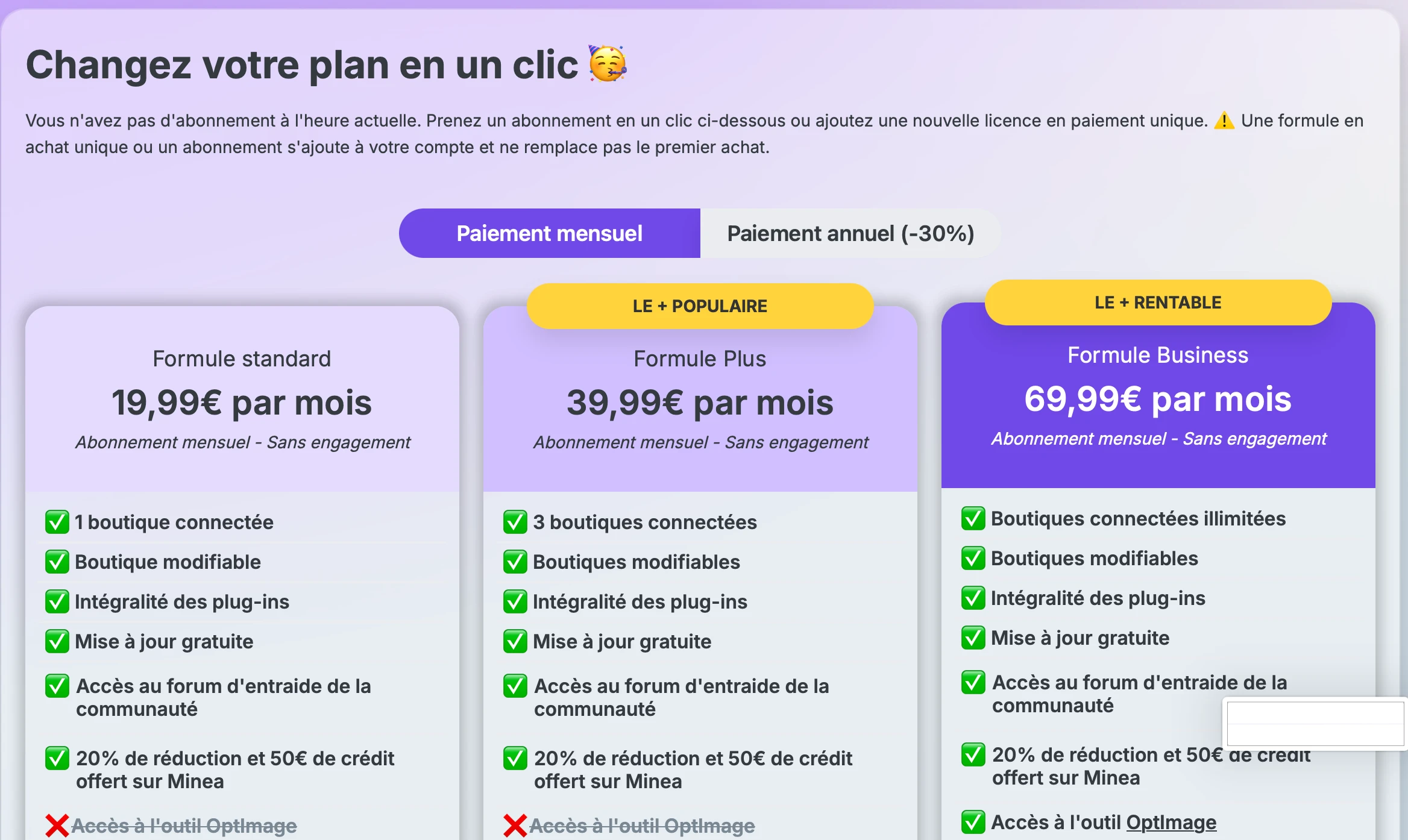
You will arrive on the “Change your plan in one click” page.
This page allows you to compare the different available offers and choose the one that best suits your needs.
3. Choose your payment method
You can select:
- Monthly payment
- Annual payment with displayed discount
Select the option that suits you before choosing your plan.
4. Compare the available plans
Several subscriptions are offered, with different levels of access:
Standard Plan
This plan is suitable for users with simple needs, including:
- 1 connected store
- editable store
- full access to plugins
- free updates
- access to the community support forum
- discount on Minea and free credit
Plus Plan
This plan is suitable for those who want to manage more stores, with:
- 3 connected stores
- editable stores
- full access to plugins
- free updates
- access to the community support forum
- discount on Minea and free credit
Business Plan
This plan is the most complete, with:
- unlimited connected stores
- editable stores
- full access to plugins
- free updates
- access to the community support forum
- discount on Minea and free credit
- access to Optimage, Colorify, and Textify tools
5. Click on “Change plan”
Once you have chosen your plan, click on the “Change plan” button located under the selected offer.
6. Confirm your change
Follow the validation steps displayed on the screen to finalize the update of your subscription.
Good to know
- Upgrading to a higher plan allows access to more features depending on the chosen offer.
- Available features vary depending on the selected plan.
- An annual billing option may offer a discount.
- According to the information displayed, adding a new plan or license does not automatically replace an existing purchase, but is added to the account.
Which plan to choose?
Here is a quick summary:
- Standard : for basic needs with a single store
- Plus : to manage multiple stores
- Business : for advanced access with unlimited stores and additional tools
I can't change my subscription
If the button does not appear or if the modification does not work, check that:
- you are logged into your account
- you are in the correct plan management section
- your payment method is valid
If the problem persists, contact support.