
Breadcrumb section: show visitors where they are
Show the Home > Collection > Product trail with the Story Theme Breadcrumb section or block: separator, home icon, mobile display and SEO.
The breadcrumb is the small line of links that shows visitors where they are: Home > Collection > Product. It lets them go up one level in a click, for example back to the collection from a product page. The Story Theme offers it in two forms: a Breadcrumb section, to place on any template, and a Breadcrumb block, already included on collection and product pages.

What it shows on each page
The trail builds itself based on the page being visited:
| Page | Trail shown |
|---|---|
| Product page | Home > collection the customer came from (otherwise the product's first collection) > product |
| Collection | Home > collection (and the tag filter, if there is one) |
| Blog post | Home > blog > post |
| Page, search, cart, account | Home > page name |
It isn't shown on the home page.


Where it already is
On a fresh theme, the Breadcrumb block is already in place:
- in the Collection section (Collection template) and in the Collections list page;
- at the top of the buy column of the Product page, above the rating and title.
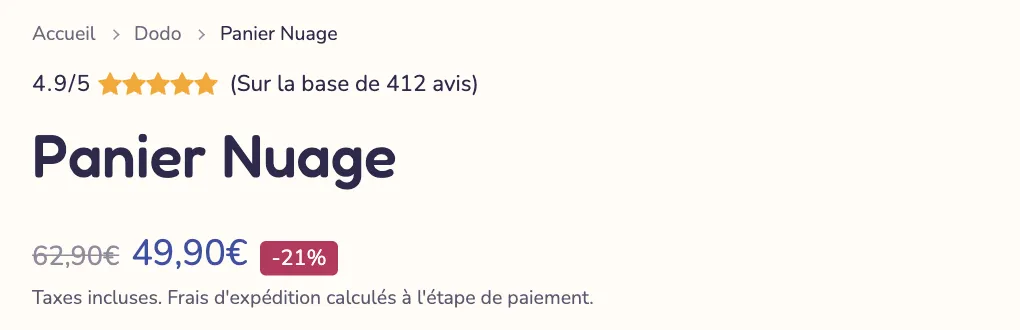
To adjust it, click this block in the section it belongs to. To remove it, hide it with the eye icon.
Add the section
On other pages (content pages, blog, blog posts…), add the section:
- In Online Store > Themes, click Edit theme and open the template you want from the dropdown at the top (for example the default page template, or the blog post template).
- Click Add section, open the Layout category and choose Breadcrumb.
- Drag the section right below the header, at the top of the list.
- Click the section's Breadcrumb block to adjust it.
In the editor, the section shows a sample trail on the home page so you can adjust how it looks.
The block is also available in Add block (Layout category): you can place it in an advanced custom section, a banner or a group.
Breadcrumb block settings
The section itself only has the shared frame (width, spacing, palette, separators, animation: see Understand the theme editor). Everything is set in its block:
- Home link: Text (default) or Icon (a small house).
- Label: the text of the first link; empty, "Home" in the visitor's language.
- Separator: Chevron (default), Slash, Vertical bar, Dot or Arrow.
- Show the current page: the last item (product or page name), not clickable. Checked by default.
- Add a collection on product pages: inserts the collection the customer came from, otherwise the product's first collection. Checked by default.
- On mobile: Shorten long titles (default), Show the full trail or Back link only (a single link to the previous level).
- Text size (13 px by default), Uppercase, Alignment and Mobile alignment.
- Show on: Desktop and mobile, Desktop only or Mobile only.
Tips and pitfalls
- The breadcrumb is marked up for search engines: Google can show this trail under your page's link in its results. See Optimize your pages' SEO.
- Put your products in collections with meaningful names: their name is what appears in the middle of the trail.
- On mobile, Back link only takes up the least space: handy on a busy product page.
- One breadcrumb per page: if the template already has one (collection, product), don't add the section as well.